
Does my phone take eSIM? The 10-second check.
The fastest way to find out works on almost every phone ever made — no menus, no model numbers, no googling.
Open your Phone app
The ordinary dialer you make calls from — on any iPhone or Android.
Type *#06#
No need to press Call — the identifiers screen appears by itself on most phones.
Look for “EID”
A long 32-digit number labelled EID (Embedded Identity Document). EID present = eSIM hardware inside. IMEI numbers only = most likely no eSIM.
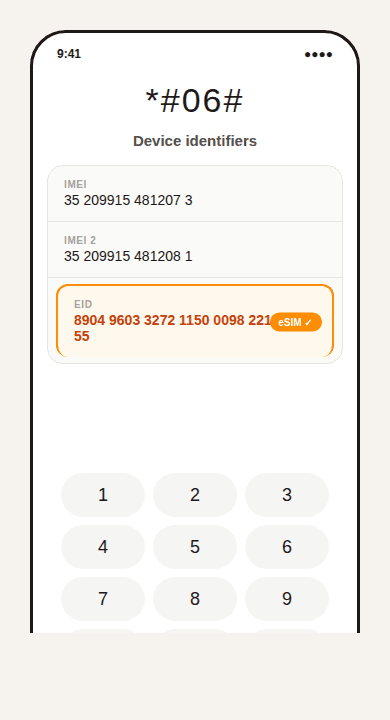
See an EID? You’re eSIM-ready.
That’s the hardware identifier for the embedded SIM. Your phone can take an eSIM — nothing else to check.
Only IMEI numbers? Probably no eSIM.
Don’t give up yet — check the settings paths below and the “if you can’t find it” section before concluding.
Or find it in Settings
Every eSIM phone has an “add eSIM” option somewhere in settings. If the option appears, your phone supports it.
iPhone
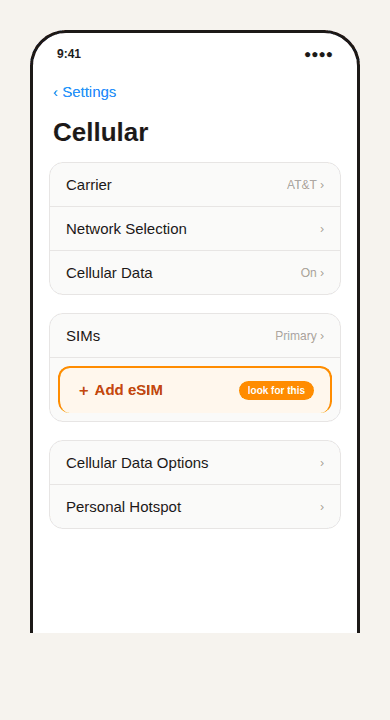
- Open Settings → Cellular (or Mobile Data / Mobile Service).
- Look for Add eSIM or Add Cellular Plan.
- Or check Settings → General → About and scroll for an EID or Digital SIM section.
Samsung Galaxy
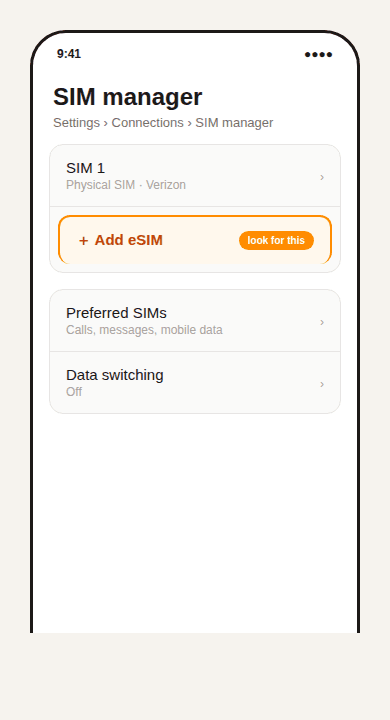
- Open Settings → Connections → SIM manager (or SIM card manager).
- Look for Add eSIM.
Google Pixel & other Android
- Open Settings → Network & internet → SIMs (or Mobile network).
- Look for Download a SIM, Add eSIM, Add SIM, or a + button.
Can’t find it? Three things to rule out
Update your software first
Older OS versions can hide the eSIM option even on phones that have the hardware. Update, restart, and check again before concluding anything.
Regional variants matter
Phones sold in mainland China often lack eSIM even when the identical model sold elsewhere has it. Check your exact model number on the manufacturer's site if in doubt.
Carrier-locked phones
Some carriers block eSIM activation on locked devices even when the hardware supports it. If your phone was bought on a contract, confirm it's unlocked.
The rule of thumb
Most iPhones from the XS, XR and SE (2nd generation) onward support eSIM. Many Android flagships from roughly 2020 onward do too. But the *#06# dialer check above is the answer that applies to your phone — it takes ten seconds.
EID found? You’re ready to travel.
Pick a plan, scan the QR code we email you, and you’re connected before you leave the airport.